Markdown rendering
When rendering an assistant message, CopilotKit uses react-markdown under the hood.
This allows us to render rich text with links, headers and other UI components.
If you wish to modify this behavior, you can either enrich and override the individual markdown components, or replace the entire <AssistantMessage /> entirely.
This is useful for displaying elements within the assistant answer text, such as source citing, reasoning steps etc.
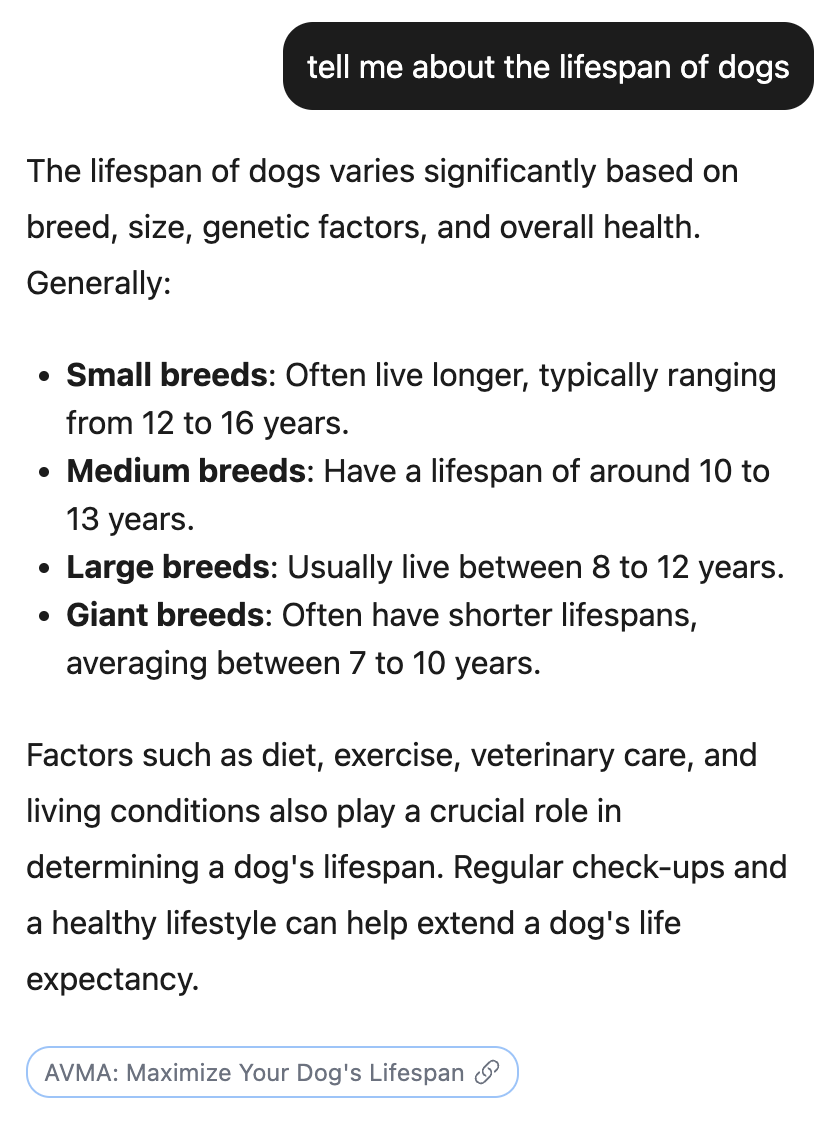
Here's how it can be done:
Replacing/Providing the markdown components with your own
We will be adding a chip component. Similar to the one available with ChatGPT when sources are cited.
First, let's create a chip component
import { CopilotKit } from "@copilotkit/react-core";
import { CopilotSidebar, ComponentsMap } from "@copilotkit/react-ui";
import "@copilotkit/react-ui/styles.css";
// We will include the styles in a separate css file, for convenience
import "./styles.css";

function YourComponent() {
    const customMarkdownTagRenderers: ComponentsMap<{ "reference-chip": { href: string } }> = {
        // You can make up your own tags, or use existing, valid HTML ones!
        "reference-chip": ({ children, href }) => {
            return (
                <a
                href={href}
                target="_blank"
                rel="noopener noreferrer"
                className="w-fit border rounded-xl py-1 px-2 text-xs" // Classes list trimmed for brevity
                >
                    {children}
                    <LinkIcon className="w-3.5 h-3.5" />
                </a>
            );
        },
    };

    return (
        <CopilotKit>
          <CopilotSidebar
            // For demonstration, we'll force the LLM to return our reference chip in every message
            instructions={`
                You are a helpful assistant.
                End each message with a reference chip,
                like so: <reference-chip href={href}>{title}</reference-chip>
            `}
            markdownTagRenderers={customMarkdownTagRenderers}
          />
        </CopilotKit>
    )
}
Now, let's add styles to the component
.reference-chip {
    display: inline-flex;
    align-items: center;
    justify-content: center;
    background-color: #f0f1f2;
    color: #444;
    border-radius: 12px;
    padding: 2px 8px;
    font-size: 0.8rem;
    font-weight: 500;
    text-decoration: none;
    margin: 0 2px;
    border: 1px solid #e0e0e0;
    cursor: pointer;
    box-shadow: 0 1px 2px rgba(0,0,0,0.05);
}
Replacing the entire markdown renderer
If you wish to avoid the markdown renderer altogether, you can replace the <AssistantMessage /> component, which is the one to use it.
See Custom Sub-Components


